A Swell AI alternative that needs no upload
Swell AI is a web app where you upload audio or video and get transcripts, show notes, clips and posts. Podcast To Transcript reads an episode from the page you are on, with nothing to upload.
Add to Chrome, it's freeUpdated November 4, 2026
- output languages
- 107
- interface languages
- 25
- free minutes a month
- 30
- export formats
- 5
The short answer
Swell AI turns your own recordings into show notes, clips and posts. Podcast To Transcript reads episodes you find online, without an upload.
| Feature | Podcast To Transcript | Swell AI |
|---|---|---|
| Where you use it | A browser extension on the episode page, plus a web app | A web app where you upload a file or connect Apple Podcasts, YouTube, an RSS feed or cloud storage |
| Plans | Free and one Pro plan | A free Hobby plan, Studio and Agency plans, and pay as you go |
| What a plan limits | Minutes of audio a month | Transcription minutes a month (300 on Studio, 600 on Agency) and one upload a month on Hobby |
| Beyond the transcript | Summary, quotes and AI tools | Show notes, articles, newsletters, video clips, audiograms and a chat trained on each episode |
| Free option | A free plan | A free Hobby plan with one upload a month |
Checked on November 4, 2026 from the other tool's public pricing page. Plans change, so confirm on their site.Source: Swell AI's public page
Choose Podcast To Transcript if you want to read someone else's episode right where you found it, without uploading a file.
Choose Swell AI if you produce a show and want show notes, clips and posts made from your own recordings.
What you get with Podcast To Transcript
Timestamps that seek
Click a line to jump the player to that moment and hear it yourself.
AI tools on the transcript
Summary, takeaways, flashcards, Cornell notes and more, generated from the text.
Export anywhere
Download the transcript as TXT, SRT, VTT, Markdown or JSON.
Moving from Swell AI in three steps
Install the extension
Add it to Chrome, Edge or Firefox. You can keep using Swell AI alongside it.
Open an episode
Use Apple Podcasts, Spotify, a YouTube video with captions or a page you allow.
Click the transcript button
Read it with speakers and timestamps, then run a summary or an AI tool.
Our plans at a glance
Pricing →Free
€0
- 30 minutes a month
- 5 runs a month
Pro
€9.99
- 800 minutes a month
- About 13 hour-long episodes a month
- 200 runs a month
See it working
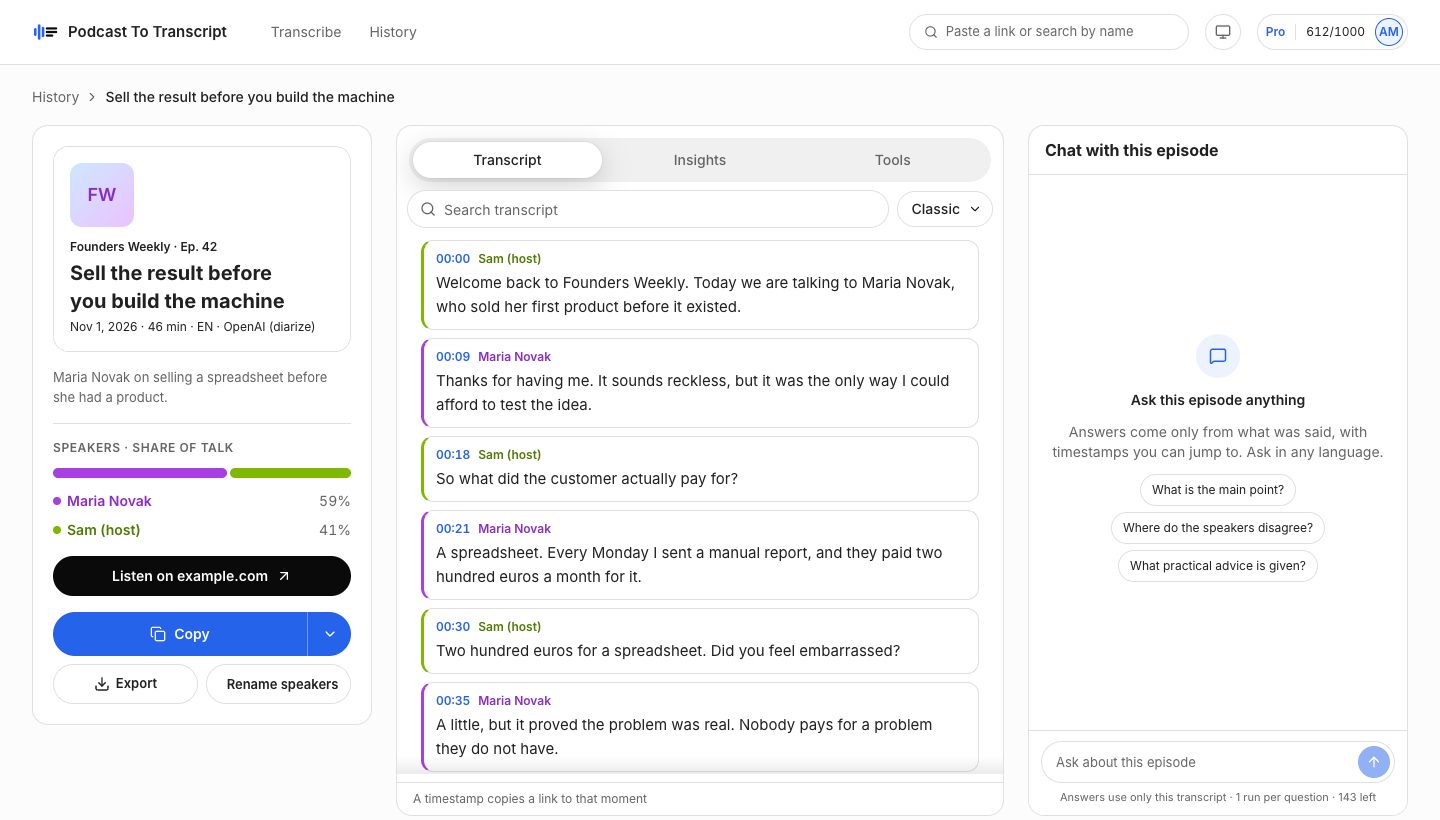
A sample episode in the web app: speaker names, timestamps, search, insights and chat on one screen.
Questions
Is Podcast To Transcript a Swell AI replacement?
Not for production work. Swell AI turns your own recordings into publishable content. Podcast To Transcript is for reading and searching episodes you find online.
How were these facts checked?
From the public pages of both tools on November 4, 2026. Plans and prices change, so confirm on their site before you decide.
Which sites does it work on?
Apple Podcasts, Spotify and YouTube videos with captions right away. Turn on all sites in Settings and it also finds episodes on show websites and other players. Episodes that are exclusive to one app cannot be transcribed.
What counts as a minute?
The length of the episode. If anyone already transcribed it with the same model, it opens instantly and uses no minutes.
What happens to my transcripts?
They stay in your history on every device. Remove any of them, or delete your account and everything goes with it.
Can I cancel Pro?
Yes, any time from Plan and billing. Pro stays active until the end of the period you paid for.
Keep reading
- A Podwise alternative that works next to the playerCompare Podwise and Podcast To Transcript: how you read episodes, what the plans include and how each is priced.
- A Podsqueeze alternative for reading episodesCompare Podsqueeze and Podcast To Transcript: what you upload, what you get back and how each plan is limited.
- YouTube podcast transcriptRead any YouTube video with captions as a transcript, with a summary and AI tools next to the player. Chrome, Edge and Firefox.
- How to transcribe a podcastGet a transcript of a Spotify, Apple Podcasts or YouTube episode with speakers and timestamps, without downloading any audio.
- Quote the guest with the exact timestampFind the exact quote, see who said it and when. Read a podcast transcript with speakers and timestamps, search it and export it.