Apple Podcasts transcript
Open an episode on Apple Podcasts in your browser and read it as text with speakers and timestamps.
Add to Chrome, it's freeUpdated November 4, 2026
- HostSo your first customer showed up before you had a product?
- NicoleExactly. We sold him a prototype in a spreadsheet.
- NicoleOnly when he did it for the third month in a row did we know it was worth automating.
- JohnAnd how much did you ask for at the start?
- output languages
- 107
- interface languages
- 25
- free minutes a month
- 30
- export formats
- 5
The short answer
To get an Apple Podcasts transcript, add the extension, open the episode in your browser and click the transcript button. It transcribes the show's public audio, labels the speakers and adds a summary.
What you get
Speakers on every line
Each speaker gets a colour and a name, so you know who said what.
Timestamps that seek
Click a line to jump the player to that moment and hear it yourself.
AI tools on the transcript
Summary, takeaways, flashcards, Cornell notes and more, generated from the text.
Three clicks from episode to notes
Open an episode
Open an episode or a show on Apple Podcasts in your browser.
Click the transcript button
It sits next to the player, or right-click any audio or link.
Read, search and run tools
Speakers, timestamps that seek the player, insights and AI tools.
What works
- Episode pages and show feeds on Apple Podcasts
- Speaker labels and timestamps that seek the player
- Summary, takeaways and AI tools in any of 107 output languages
Good to know
- Only public episodes can be transcribed. Episodes exclusive to one app cannot.
- Noisy audio or rarer languages can lower accuracy. Pro lets you pick another model per episode.
Our plans at a glance
Pricing →Free
€0
- 30 minutes a month
- 5 runs a month
Pro
€9.99
- 800 minutes a month
- About 13 hour-long episodes a month
- 200 runs a month
See it working
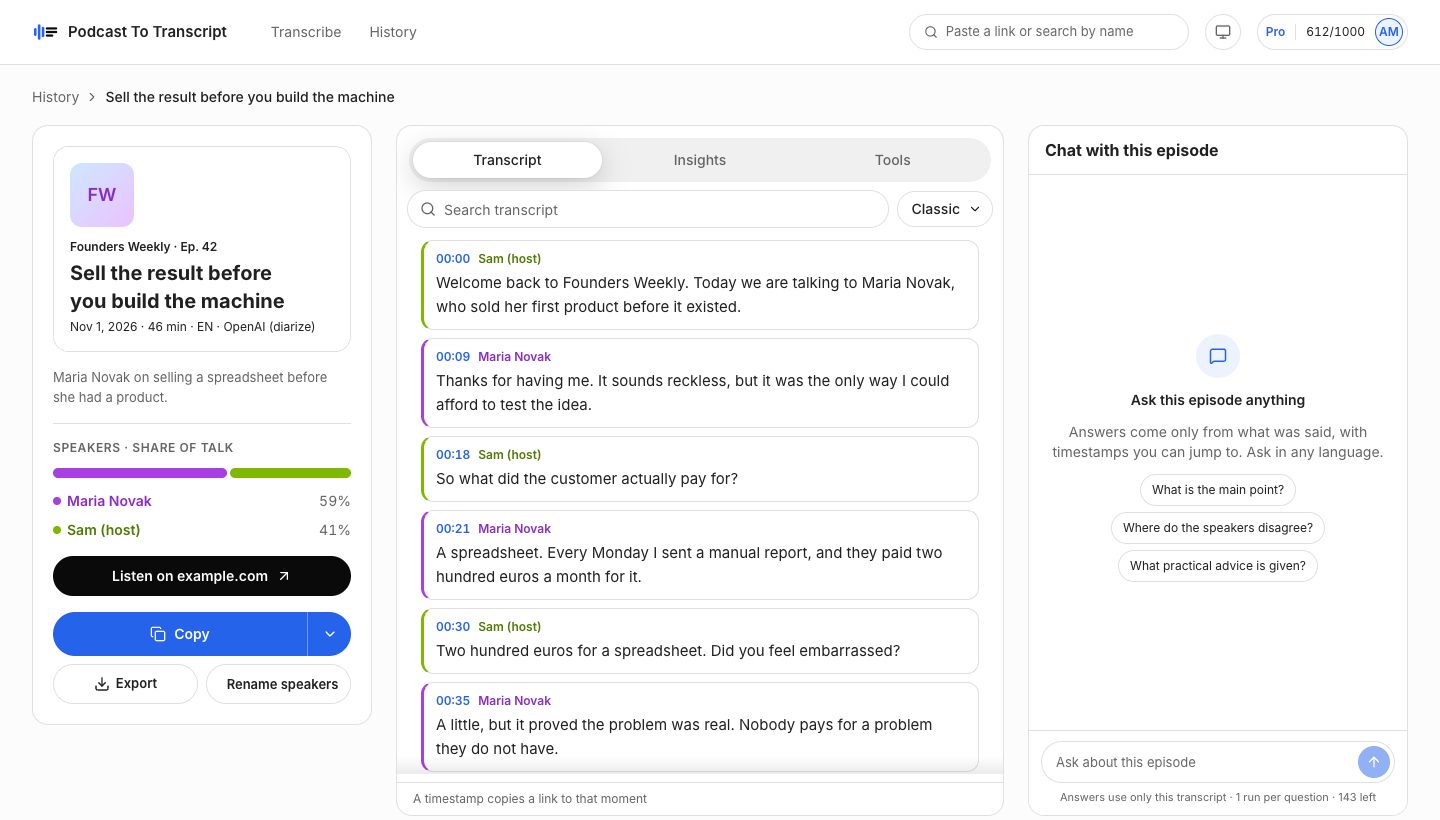
A sample episode in the web app: speaker names, timestamps, search, insights and chat on one screen.
Questions
What counts as a minute?
The length of the episode. If anyone already transcribed it with the same model, it opens instantly and uses no minutes.
Is this affiliated with Apple?
No. Podcast To Transcript is independent and is not endorsed by Apple. Apple Podcasts is a trademark of Apple Inc.
Which sites does it work on?
Apple Podcasts, Spotify and YouTube videos with captions right away. Turn on all sites in Settings and it also finds episodes on show websites and other players. Episodes that are exclusive to one app cannot be transcribed.
What happens to my transcripts?
They stay in your history on every device. Remove any of them, or delete your account and everything goes with it.
Can I cancel Pro?
Yes, any time from Plan and billing. Pro stays active until the end of the period you paid for.
Keep reading
- YouTube podcast transcriptRead any YouTube video with captions as a transcript, with a summary and AI tools next to the player. Chrome, Edge and Firefox.
- Spotify podcast transcriptRead Spotify podcast episodes as a transcript with speakers, timestamps, a summary and AI tools. Free to start on Chrome, Edge and Firefox.
- How to transcribe a podcastGet a transcript of a Spotify, Apple Podcasts or YouTube episode with speakers and timestamps, without downloading any audio.
- Quote the guest with the exact timestampFind the exact quote, see who said it and when. Read a podcast transcript with speakers and timestamps, search it and export it.
- A Podwise alternative that works next to the playerCompare Podwise and Podcast To Transcript: how you read episodes, what the plans include and how each is priced.