Quote the guest with the exact timestamp
Every line has a speaker and a timestamp, so you can check a quote against the audio in seconds.
Add to Chrome, it's freeUpdated November 4, 2026
We never planned for that outcome, and nobody asked us to.
Nicole
- output languages
- 107
- interface languages
- 25
- free minutes every 14 days
- 30
- export formats
- 5
How journalists use a podcast transcript
Five moments in a reporting day when reading the episode beats replaying it.
- Before an interview
Check what your guest already said on air
Search a past appearance for the topic you plan to raise, so your questions skip what they have answered and push on what they have not.
You get: a searchable record of earlier words
- On deadline
Pull a quote with speaker and timestamp
Copy the line, its speaker label and the time, then play that second to confirm the wording before it goes into copy.
You get: a quote you can verify
- Fact-checking
Find where a number was first stated
Search for the figure or the name and jump the player to the moment, so a claim in the draft traces back to a sentence in the episode.
You get: the exact moment of a claim
- Background reading
Skim a long interview before the call
Read the summary and takeaways of a two-hour conversation, then open only the section that bears on your story.
You get: summary and takeaways
- Reporting abroad
Follow a podcast in a language you read slowly
The transcript stays in the spoken language. Read the summary in your own and check key passages against the original.
You get: the summary in your language
What you get
Speakers on every line
Each speaker gets a colour and a name, so you know who said it before you quote it.
Timestamps that seek
Click any line to jump the player there and hear it yourself before it goes to print.
Search your history
Every transcript is searchable on every browser you sign in to.
Quotes you can check
Pull notable quotes with the exact timestamp, so you can verify the wording against the audio before you print it.
Chat with the episode
Ask who said what about a topic and get an answer grounded in the transcript.
Questions and claims
Q&A and References list what was asked, what was claimed and which sources were named.
Three clicks from episode to notes
Open an episode
On Apple Podcasts, Spotify or any page with an audio player.
Click the transcript button
It sits next to the player, or right-click any audio or link.
Read, search and run tools
Speakers, timestamps that seek the player, insights and AI tools.
Our plans at a glance
Pricing →Free
€0
- 30 minutes every 14 days
- 5 runs every 14 days
Pro
€9.99
- 800 minutes a month
- About 13 hour-long episodes a month
- 200 runs a month
See it working
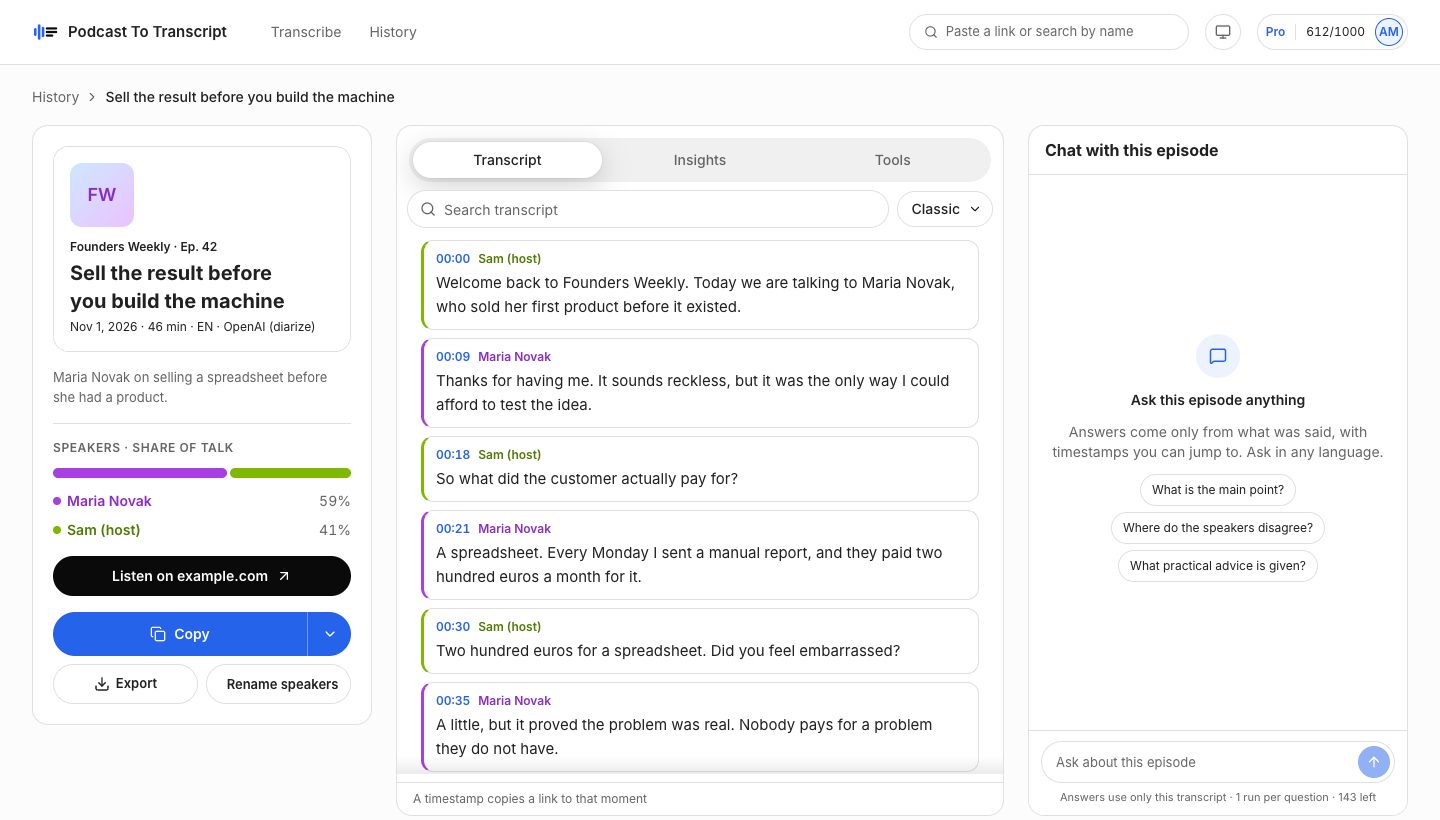
A sample episode in the web app: speaker names, timestamps, search, insights and chat on one screen.
Questions
Can I rely on the transcript as a quote?
Treat it as a fast first pass. Check the exact words against the audio at the timestamp before you publish.
Can I read interviews in another language?
Yes. The transcript is in the language spoken in the episode. Insights, tools and chat work in any of 107 output languages.
Which sites does it work on?
Apple Podcasts, Spotify and YouTube videos with captions right away. Turn on all sites in Settings and it also finds episodes on show websites and other players. Episodes that are exclusive to one app cannot be transcribed.
What counts as a minute?
The length of the episode. If anyone already transcribed it with the same model, it opens instantly and uses no minutes.
What happens to my transcripts?
They stay in your history on every device. Remove any of them, or delete your account and everything goes with it.
Can I cancel Pro?
Yes, any time from Plan and billing. Pro stays active until the end of the period you paid for.
Keep reading
- Turn a lecture podcast into study notesTurn a lecture podcast into a transcript, a summary, flashcards and study notes. Search it later and read it in your own language.
- From one episode to a week of postsTurn an episode into a transcript, show notes, a LinkedIn post or a thread, with quotes and timestamps. Works on Apple Podcasts, Spotify and YouTube.
- YouTube podcast transcriptRead any YouTube video with captions as a transcript, with a summary and AI tools next to the player. Chrome, Edge and Firefox.
- How to transcribe a podcastGet a transcript of a Spotify, Apple Podcasts or YouTube episode with speakers and timestamps, without downloading any audio.
- A Podwise alternative that works next to the playerCompare Podwise and Podcast To Transcript: how you read episodes, what the plans include and how each is priced.