Search a tech podcast like you search the docs
Developers can read an episode as text, search for a tool or a library name, and jump the player to the exact point where the guest explained it.
Add to Chrome, it's freeUpdated November 4, 2026
We rewrote the queue three times before we admitted the problem was the schema.
Nicole
- output languages
- 107
- interface languages
- 25
- free minutes every 14 days
- 30
- export formats
- 5
How developers use a tech podcast transcript
Engineering interviews and conference talks you can search like documentation.
- Choosing a tool
Find where a maintainer explained a trade-off
Search an interview for the library name and jump to the part where the guest compares it with the alternatives.
You get: the trade-off, with a time
- Architecture reading
Skim a long systems interview
Read the summary and takeaways of a long conversation and open only the section on your stack.
You get: summary and takeaways
- Team learning
Share a talk as text
Send colleagues a transcript with timestamps, so they can read the argument before deciding to watch.
You get: a transcript to share
- Your notes
Keep episode notes in Markdown
Export Markdown and store it in your repo, your notes app or the team wiki.
You get: notes in Markdown
- Reading in another language
Follow a talk in a language you read less easily
The transcript stays in the spoken language while the summary can be in your own. Check code terms against the original.
You get: the summary in your language
What you get
Search a tool or a pattern
Find a library, a framework or an architecture term across the transcript and every episode you have read.
Takeaways first
Read the main points of a long interview and open only the section that applies to your stack.
Timestamps that seek
Click a line to hear the guest's explanation and save the time for your notes.
Speakers on every line
Tell the maintainer's answer from the host's question in a long conversation.
Notes in Markdown
Export Markdown and keep it in your repo, your notes app or an internal wiki.
Read in your language
Get the summary in any of 107 output languages when the episode is in a language you read less easily.
Three clicks from episode to notes
Open an episode
On Apple Podcasts, Spotify or any page with an audio player.
Click the transcript button
It sits next to the player, or right-click any audio or link.
Read, search and run tools
Speakers, timestamps that seek the player, insights and AI tools.
Our plans at a glance
Pricing →Free
€0
- 30 minutes every 14 days
- 5 runs every 14 days
Pro
€9.99
- 800 minutes a month
- About 13 hour-long episodes a month
- 200 runs a month
See it working
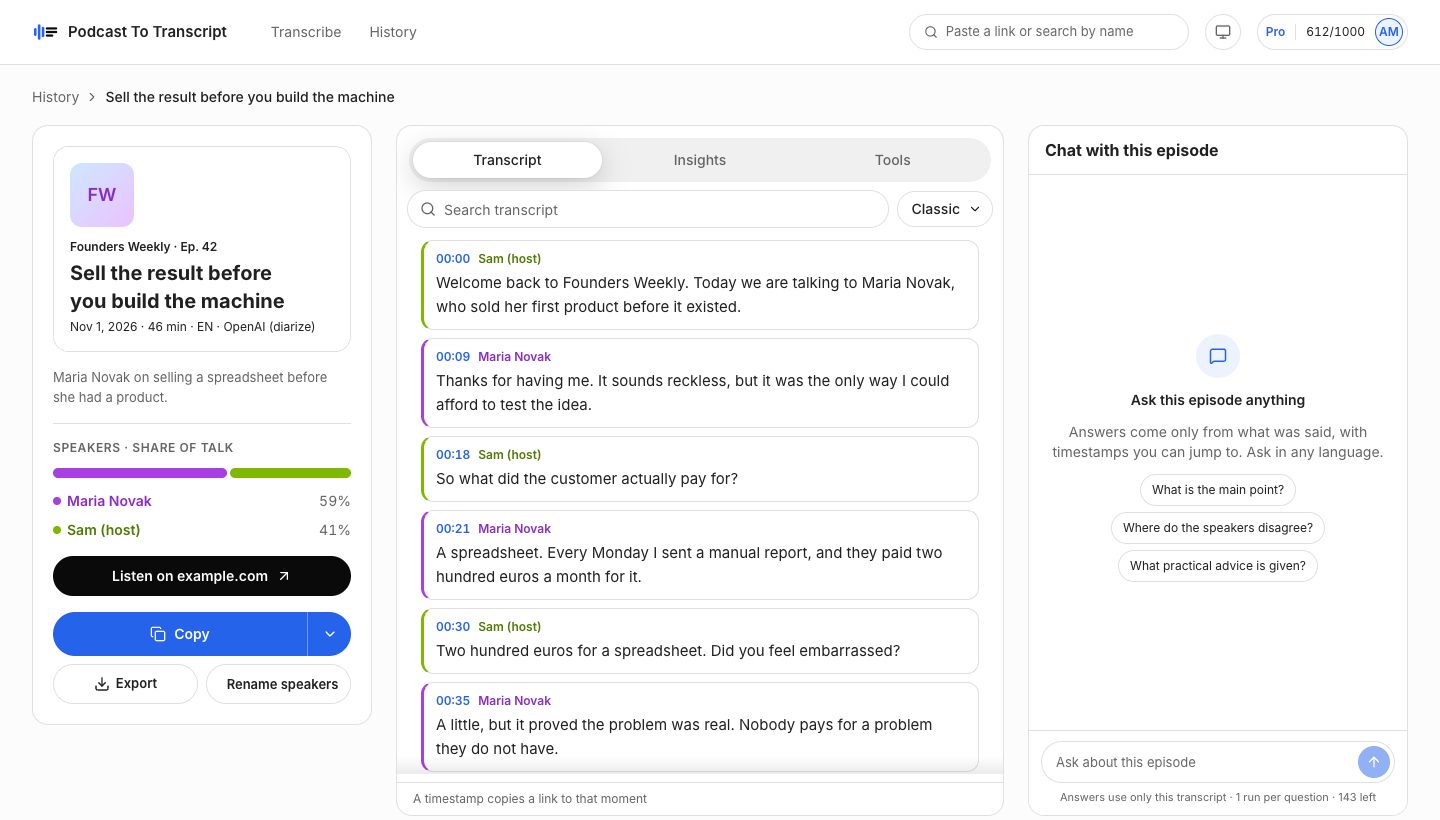
A sample episode in the web app: speaker names, timestamps, search, insights and chat on one screen.
Questions
Does it handle technical terms and library names?
It does well on clear speech, but names, acronyms and code terms can be misheard. Check anything you plan to use against the docs.
Does it work on conference talks?
It works on episodes and videos the extension can play, including YouTube talks. Quality depends on the audio.
Which sites does it work on?
Apple Podcasts, Spotify and YouTube videos with captions right away. Turn on all sites in Settings and it also finds episodes on show websites and other players. Episodes that are exclusive to one app cannot be transcribed.
What counts as a minute?
The length of the episode. If anyone already transcribed it with the same model, it opens instantly and uses no minutes.
What happens to my transcripts?
They stay in your history on every device. Remove any of them, or delete your account and everything goes with it.
Can I cancel Pro?
Yes, any time from Plan and billing. Pro stays active until the end of the period you paid for.
Keep reading
- Quote the guest with the exact timestampFind the exact quote, see who said it and when. Read a podcast transcript with speakers and timestamps, search it and export it.
- Turn a lecture podcast into study notesTurn a lecture podcast into a transcript, a summary, flashcards and study notes. Search it later and read it in your own language.
- YouTube podcast transcriptRead any YouTube video with captions as a transcript, with a summary and AI tools next to the player. Chrome, Edge and Firefox.
- How to transcribe a podcastGet a transcript of a Spotify, Apple Podcasts or YouTube episode with speakers and timestamps, without downloading any audio.
- A Podwise alternative that works next to the playerCompare Podwise and Podcast To Transcript: how you read episodes, what the plans include and how each is priced.