Quote the legal podcast with the exact timestamp
Lawyers, paralegals and law students can read a legal podcast as text, search for a case or statute, and cite the speaker and the time.
Add to Chrome, it's freeUpdated November 4, 2026
The court read the clause narrowly, and that changes how every drafter should write it.
Nicole
- output languages
- 107
- interface languages
- 25
- free minutes every 14 days
- 30
- export formats
- 5
How lawyers use a legal podcast transcript
Case commentary and practice-area interviews you can search and cite.
- Before a client meeting
Find what the commentator said about a ruling
Search an episode for the case name and jump to the minute the analysis starts.
You get: a case-name search
- While drafting
Quote a guest with the speaker and the time
Copy the line with its speaker label and timestamp for a footnote, then check the audio.
You get: a quote you can cite
- On the commute
Read the episode instead of playing it
Skim the summary of a long discussion and open only the section you need.
You get: summary and takeaways
- Studying for the bar
Turn a discussion into outline notes
Generate flashcards and outline notes from an episode on a single doctrine.
You get: flashcards and notes
- Across your research
Search every episode you have transcribed
Look up one statute or phrase across your whole history and open the best match.
You get: one search across episodes
What you get
Named speakers
Every line shows who spoke, so you can attribute an argument to the right guest or host.
Timestamps you can cite
Click a line to jump the player there and note the time for a footnote or a client memo.
Search a case or a statute
Find a case name, a section or a phrase across the transcript and across your history.
Summary before you commit the hour
Read the main points and takeaways of an episode to decide if it is worth the full listen.
Study outlines for law students
Turn a discussion of a decision into outline notes and flashcards for exam preparation.
Export for your file
Download TXT or Markdown and keep it with your research notes.
Three clicks from episode to notes
Open an episode
On Apple Podcasts, Spotify or any page with an audio player.
Click the transcript button
It sits next to the player, or right-click any audio or link.
Read, search and run tools
Speakers, timestamps that seek the player, insights and AI tools.
Our plans at a glance
Pricing →Free
€0
- 30 minutes every 14 days
- 5 runs every 14 days
Pro
€9.99
- 800 minutes a month
- About 13 hour-long episodes a month
- 200 runs a month
See it working
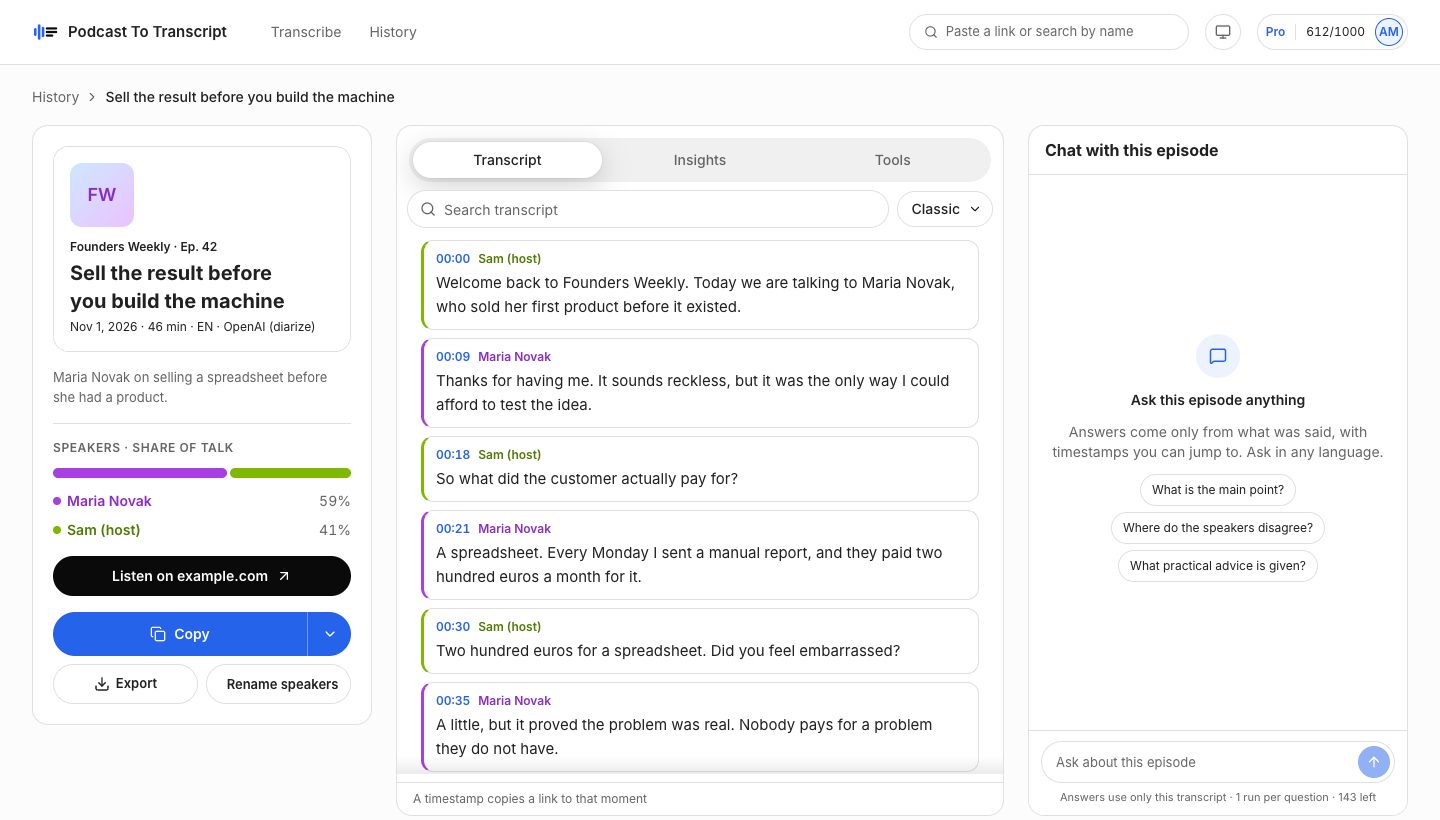
A sample episode in the web app: speaker names, timestamps, search, insights and chat on one screen.
Questions
Is the transcript an official record?
No. It is an automatic transcript of a podcast and can contain errors. For anything you cite or rely on, check the recording.
Does it replace a court reporter?
No. It is for published podcast episodes, not for hearings, depositions or client calls.
Which sites does it work on?
Apple Podcasts, Spotify and YouTube videos with captions right away. Turn on all sites in Settings and it also finds episodes on show websites and other players. Episodes that are exclusive to one app cannot be transcribed.
What counts as a minute?
The length of the episode. If anyone already transcribed it with the same model, it opens instantly and uses no minutes.
What happens to my transcripts?
They stay in your history on every device. Remove any of them, or delete your account and everything goes with it.
Can I cancel Pro?
Yes, any time from Plan and billing. Pro stays active until the end of the period you paid for.
Keep reading
- Quote the guest with the exact timestampFind the exact quote, see who said it and when. Read a podcast transcript with speakers and timestamps, search it and export it.
- Turn a lecture podcast into study notesTurn a lecture podcast into a transcript, a summary, flashcards and study notes. Search it later and read it in your own language.
- YouTube podcast transcriptRead any YouTube video with captions as a transcript, with a summary and AI tools next to the player. Chrome, Edge and Firefox.
- How to transcribe a podcastGet a transcript of a Spotify, Apple Podcasts or YouTube episode with speakers and timestamps, without downloading any audio.
- A Podwise alternative that works next to the playerCompare Podwise and Podcast To Transcript: how you read episodes, what the plans include and how each is priced.